If you’re a local business owner, ranking higher on Google Maps means more visibility, more phone calls, and more booked jobs. And it all starts with your Google Business Profile (GBP).
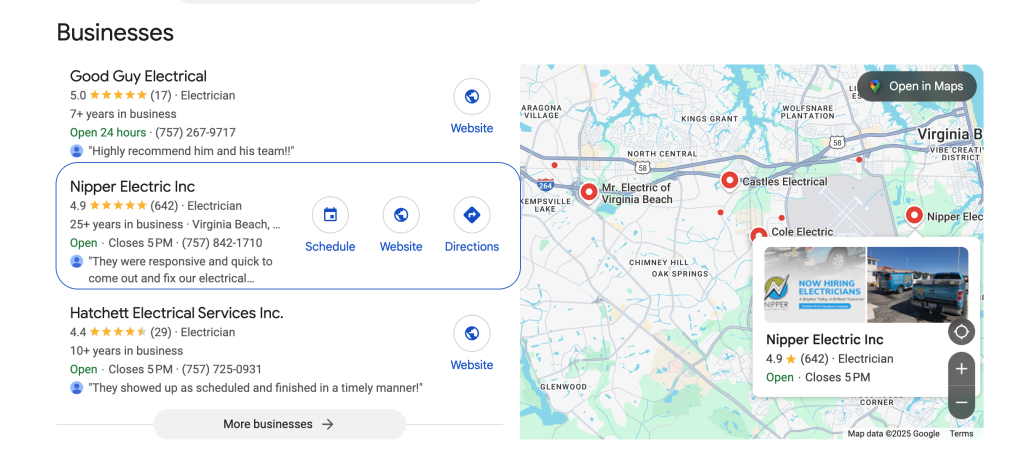
Your GBP is one of the most important tools for showing up in the Google Map Pack — that 3-pack of businesses that appear at the top of local search results. But here’s the catch:
Most business owners think they’ve optimized their listing… when they really haven’t.
Google frequently updates its features and ranking signals, so what worked two years ago might not work today. And if your profile is incomplete, outdated, or inconsistent, it’s holding you back from leads you could already be getting.
This updated 2025 checklist will walk you through every essential step to fully optimize your Google Business Profile — no fluff, just results.
Let’s dive in.
Core Business Info (The Foundation)
Before you do anything fancy with your listing, you need to make sure the basic information is 100% accurate and consistent. This is the foundation Google uses to verify your legitimacy and connect your business to local searches.
✅ Business Name
Use your real-world business name — exactly as it appears on your storefront, signage, or business paperwork.
❌ Don’t stuff it with keywords like “Joe’s Plumbing – Best Plumber San Diego.
✅ Use “Joe’s Plumbing” and optimize elsewhere.
✅ Address
Make sure your address is accurate and consistent with what’s on your website and citations. If you’re a service-area business and don’t serve customers at your location, you can hide your address and set a service area instead.
✅ Local Phone Number
Always use a local area code, not a toll-free or tracking number. Google prefers numbers that match the area you serve.
✅ Website URL
Link to your main website or — better — to a location-specific landing page that matches the user’s search intent.
💡 Example: A med spa in La Mesa might link directly to domain.com/la-mesa-med-spa
✅ Business Hours
If you travel to your customers, define a service area by cities or ZIP codes instead of using a physical address. Don’t try to list dozens of cities — keep it focused and realistic.
🛠 Quick Pro Tip: Run a consistency check across your website, Yelp, BBB, and local directories. Your name, address, and phone (NAP) should be identical everywhere.
Categories & Services
Your business categories and services tell Google what you do — and they are among the most important ranking factors in the Map Pack. Choosing the right primary category can make or break your visibility. Listing specific services tells Google what searches your business should appear in.
✅ Primary Category (This One’s Crucial)
Your primary category is the #1 way Google determines your relevance to a search query.
Get this wrong, and no amount of reviews or website content will save your rankings.
Do this:
💡 Example:
- If you're a plumber, set your primary category to “Plumber” — not “Contractor.
- If you're a med spa, choose “Medical Spa” — not “Skin Care Clinic.
✅ Secondary Categories
You can add multiple secondary categories that support your business offerings.
Do this:
💡 Pro Tip: Don’t add categories for services you don’t actually perform — it confuses Google and can hurt your relevance.
✅ Services Section
Most business owners skip this section or leave it blank. Don’t be that person — this is keyword gold.
Do this:
💡 Example: “We install and replace tankless water heaters in San Diego, Chula Vista, and surrounding areas.”
🚫 What to Avoid:
🛠 Quick Action Step:
1. Search for your main service + city on Google Maps.
2. Check which categories the top 3 competitors are using.
2. Then update yours to match or improve — based on what you actually offer.
Business Description
Your business description is one of the few areas in your Google Business Profile where you can freely write text — and it’s one of the best places to include strategic keywords, locations, and trust-building language.
But most business owners either:
Let’s fix that.
✅ What Google Allows in the Description
You get up to 750 characters to describe your business. This content doesn’t directly impact your ranking like categories or reviews do, but it does influence:
🧠 Best Practices for Writing Your Business Description
✍️ Example (for an Electrician):
“We’re licensed electricians serving San Diego, Chula Vista, and surrounding areas. With over 10 years of experience, we specialize in panel upgrades, EV charger installation, outdoor lighting, and emergency repairs. We pride ourselves on fast response times, fair pricing, and 5-star service.”
✅ Quick Optimization Checklist:
🛠 Bonus Tip: Update your description any time you shift your focus, change service areas, or want to test new keyword variations.
Photos & Visual Content
Photos do more than make your Google Business Profile look nice — they boost engagement, help build trust with potential customers, and send relevance signals to Google.
A photo-rich, active GBP tends to outperform profiles that look outdated, empty, or overly generic.
✅ Why Photos Matter
📷 The 5 Types of Photos You Should Upload
🌍 Pro Tip: Geo-Tag Your Photos: Before uploading, rename and geo-tag your photos with location data and relevant keywords.

Example filename: ac-repair-chula-vista.jpg
This sends strong local relevance signals to Google — especially when combined with service-related terms.
📅 How Often Should You Upload?
❌ What to Avoid:
🛠 Quick Tip: Encourage field technicians or staff to snap 2–3 pics per job — then send them to your marketing team or upload directly to GBP.
Posts & Updates
Your Google Business Profile isn’t a static listing — it’s a content channel.
GBP Posts are like social media updates, but with direct visibility in search results and Maps.
✅ When you post regularly, you tell Google:
This business is active, trustworthy, and staying current. (Which increases your chances of ranking in the Map Pack.)
✅ What Are GBP Posts?
Posts appear on your business profile when people view it in Google Search or Maps.
They can include:
Google often features recent posts in the “Updates” section of your listing — especially on mobile.
📅 How Often Should You Post?
Each post lasts 7 days in the default view, so frequency matters.
✍️ Post Type Examples:
- Promotions: “$50 off drain cleaning this week in San Diego – Call now!”
- Recent Jobs: “Just installed a 240v EV charger in Chula Vista – Book yours today.
- Reviews: “Another happy customer! Thanks for the 5-star review, Mike!”
- Tips/FAQs: “3 signs your AC unit needs maintenance before summer hits.”
- Team Shoutouts: “Shoutout to Luis for completing 12 projects this month 👏”
🖼 Format Tips:
Include your keywords and service areas naturally (e.g., “Window tinting in El Cajon”)
🧲 CTA Buttons to Use:
🛠 Pro Tip: Track performance using UTM parameters in the URL so you can see post traffic in Google Analytics.
❌ What to Avoid:
🛠 Quick Win: Set a calendar reminder every Monday to post something — a job photo, a tip, or a testimonial. 2 minutes of effort = big long-term gains.
Reviews & Responses
If there’s one section that can rapidly boost trust, visibility, and conversions, it’s your Google reviews.
Reviews don’t just influence customer decisions — they’re a ranking factor. Google uses them to evaluate:
✅ Why Reviews Matter for Rankings
Google loves to show listings that have:
They signal that you’re active, real, and delivering quality service.
📈 What You Should Aim For
🧠 How to Ask for Reviews (Effectively)
Use these tactics to get consistent reviews without begging:
✅ 1. Ask Right After the Job
The best time is immediately after you’ve delivered value.
💡 Example: “Hey [Customer Name], glad we could help you today. It would mean a lot if you could leave us a quick Google review. Here’s the link.”
✅ 2. Use Automated Follow-Ups
Tools like GoHighLevel allow you to:
✅ 3. Make It Frictionless
Use your direct Google review link (with the popup ready). Don’t just send them to your listing — send them right to the box.
🧠 How to Respond (And Why It Matters)
Google loves when you engage with customers.
✍️ Review Response Template (Positive):
“Thanks so much, [Name]! We’re glad you were happy with your [service name]. Let us know if you ever need help with [related service]. Serving [City] homeowners like you is what we love to do!”
❌ What to Avoid:
🛠 Quick Tip: Train your techs, front desk, or sales reps to ask for reviews as a standard part of every job. Incentivize internally if needed — it’s that important.
Advanced Optimization Tips
Once your core info, categories, photos, posts, and reviews are in place, it’s time to boost your edge with lesser-used features that most business owners ignore.
These extras don’t just help you stand out — they send bonus signals to Google that you’re active, organized, and customer-focused.
✅ 1. Add Products (Even if You Sell Services)
The “Products” section isn’t just for retail. You can use it to showcase:
Each product listing includes a title, photo, price (optional), and description. Think of them as mini landing pages inside your GBP.
✅ 2. Enable Booking Buttons
If your business takes appointments (e.g., med spa, clinic, estimates), enable Bookings using supported scheduling tools like:
💡 Google makes booking buttons highly visible — giving you an instant edge over competitors with just a “Call Now” option.
✅ 3. Turn on Messaging (with Auto-Replies)
Allow customers to message you directly through your listing — especially useful for mobile searches.
Set it up in GBP > Messages > Turn On
You can also:
✅ 4. Use UTM Parameters in Your Website Link
Want to know how many people actually click from your GBP to your site?
Add UTM tracking to your website URL:
💡 Example: https://yourwebsite.com?utm_source=google&utm_medium=organic&utm_campaign=gbp
This lets you see GBP traffic clearly in Google Analytics and know what converts.
✅ 5. Add Local Business Schema to Your Website
Schema = structured data code that helps Google connect your website to your GBP.
Use Schema.org’s local business format to add:
🧠 Advanced Pro Tip: Combine UTM tracking with weekly GBP posts and call tracking numbers (in GA4 or CallRail) to understand which GBP elements actually drive leads.
❌ What to Avoid:
Free Tools to Audit Your GBP
Even if you’ve followed the checklist so far, it’s smart to audit your Google Business Profile regularly — just like you’d get a tune-up for your car.
These tools help you spot gaps, monitor rankings, and track improvements over time.
🛠️ 1. Local Falcon
Visual map grid tool to track where your business ranks across a service area.
Great for measuring true visibility — not just keywords.
🛠️ 2. SEO NEO
All-in-one tool for keyword tracking, map visibility audits, and GBP monitoring.
Built specifically for local SEO professionals.
🛠️ 3. PlePer GBP Audit Tool (Free)
Gives you a side-by-side audit of your GBP against top competitors.
✅ Bonus Tip: Screenshot your Local Falcon map grid every month to track progress. It’s visual proof of your SEO efforts paying off.
Conclusion
Your Google Business Profile is your #1 local lead generator — if it’s fully optimized.
And now, with this 2025 checklist, you have the tools to:
But here’s the thing…
Most businesses won’t actually go through and implement all this on their own — and that’s okay.
👉 If you want expert help to optimize your profile, boost your rankings, and get measurable results…
👉 Book a Free Strategy Call Here
We’ll show you exactly what’s missing, what to fix, and how to outrank your local competitors — fast.

